 VidiBot
Build a repeatable task flow
Choose a platform, browser profile, media folder, and schedule.
Plan browser-based publishing, organize media and profiles, and review every result.
Your tasks stay visible. You decide when to run them.
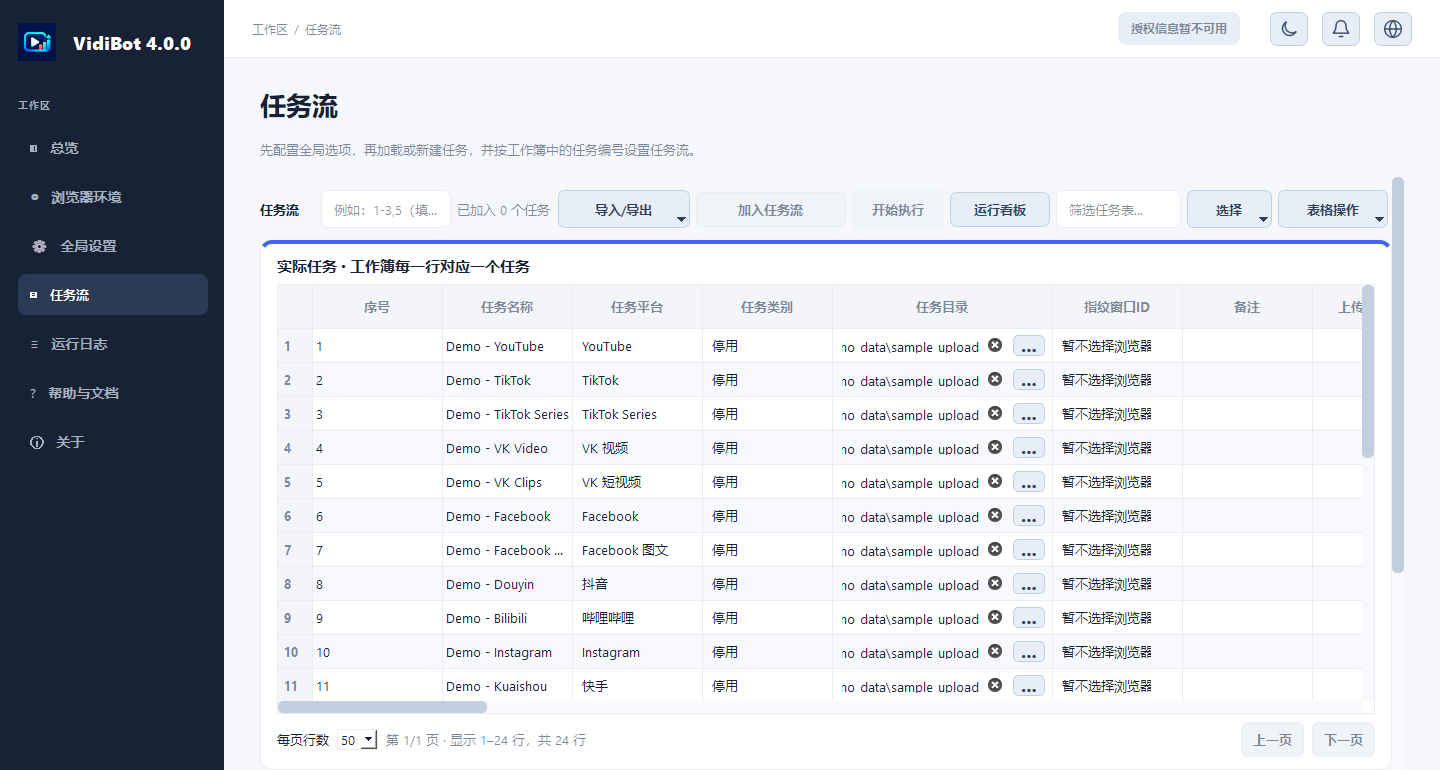
Hover or click a marker to explore the task board
Adds ShardBrowser support and an alternate licensing-service address.
Manage preparation, browser environments, task settings, and execution results in one desktop workflow.
Choose a platform, browser profile, media folder, and schedule.
Video, title, description, image, and subtitles in one clear folder.
Connect a profile and assign it to the task you want to run.
See status, upload details, and logs in one place.
The screenshots show the actual desktop interface. Profile names and connection details are fictional examples; no external browser service or publishing account is connected.
Explore the setup guides ↗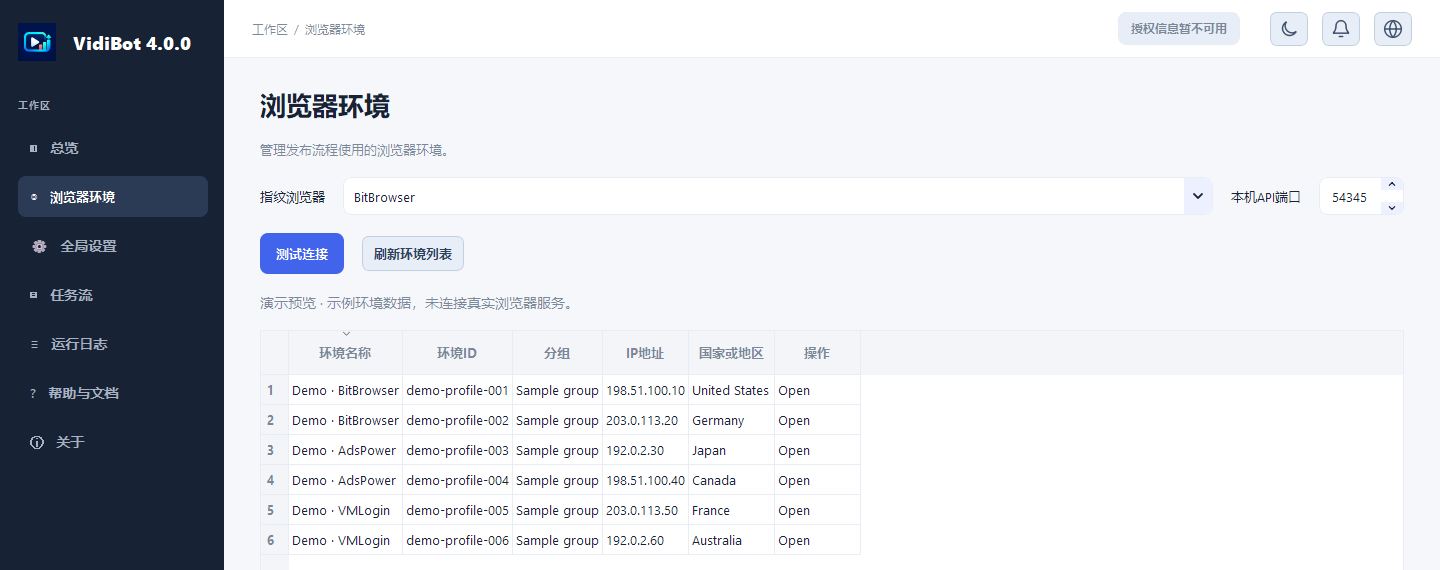
Start with one browser profile and one task. Confirm the details, run it yourself, then use the result view to decide what to do next.
Read the getting-started guides ↗Connect a supported browser and load the profile you intend to use.
Choose platform behavior and task defaults, then save your settings.
Choose platform, profile, media, and timing. Fill optional fields only when needed.
Start selected tasks and check status, upload details, and execution logs.
VidiBot interacts with publishing websites through browser automation. Website changes, account checks, and browser versions can affect a workflow.
Check the current release notes and test the account workflow you need. A platform name is not a promise that every task is available or recently verified.
Platform names belong to their respective owners. VidiBot is independent and is not endorsed by these services.
Older tutorials can drift as software and platform interfaces change. These guides focus on durable setup steps and call out version-specific details.
Install, connect a browser, prepare one task, and review the outcome.
↗02 · ENVIRONMENTLocal API settings, profile lists, and practical connection checks.
↗03 · CONTENTFolder structure and optional title, description, image, and subtitle assets.
↗04 · TASKSChoose the platform, browser profile, task type, and timing.
↗05 · TROUBLESHOOTUse the task board, upload details, and logs to find the next step.
↗RELEASE NOTESConfirm current behavior before following older platform-specific tips.
↗07 · AI & WORKFLOWSCompare flexibility, repeatability, costs, and platform considerations.
↗Screens and control names may vary by version. If your screen differs, check the release notes for your current version.
Publishing uses browser interfaces, not platform upload APIs. VidiBot checks licenses online; see the privacy policy for the data we handle, why we use it, and how long we retain it.
Read the privacy policy ↗01You manage task settings and media files on your computer.
02The app contacts VidiBot services for license validation and related account functions.
03Publishing site changes may affect browser automation; check and supervise each run.
Prices are shown in EUR, including applicable tax. The secure checkout confirms the final amount before payment.
Try the full VidiBot feature set for seven days.
One active device license. Renewed every month until you cancel.
The same one-device license, billed once a year and renewed annually until you cancel.
Prices are shown in EUR including applicable tax; confirm the final amount at secure checkout before payment. Subscriptions renew at the selected interval until cancelled.
Practical details about browser workflows, platform support, and licensing.
VidiBot 通过平台网站的浏览器界面运行发布工作流。这不同于调用官方上传 API;平台网站改版可能影响工作流。
不是。支持的任务类型取决于平台和软件版本。请查看当前更新说明,确认你需要的工作流已列出。
需要 Windows 10 或 11 电脑、VidiBot、受支持的浏览器环境,以及准备发布的素材和任务信息。请按照设置指南连接并检查浏览器环境。
任务设置和素材文件由你的电脑管理。VidiBot 会连接服务端处理授权和订阅功能。发布时,你选定的平台会收到你通过其网站提交的内容。
网站结账会要求填写 VidiBot 设置页面显示的机器码。机器码会发送给 VidiBot 授权服务,用于将订阅绑定到一台设备;不会发送给 Stripe。
会。月度和年度方案都会按所选周期自动续费,直到取消。付款前,安全结账页面会显示最终金额和适用税费。
使用结账时的邮箱登录 VidiBot 个人账号页,再从订单或账户详情中的订阅管理链接查看和管理续费。
请先查看与你安装版本对应的使用指南和更新说明。如仍需帮助,请发邮件至 1066ee@gmail.com,并注明软件版本和遇到的问题。
Check the current version and setup information, then verify one workflow end to end.